Delete Your Driver Account | حذف حساب السائق
How to delete your Arabanji driver account
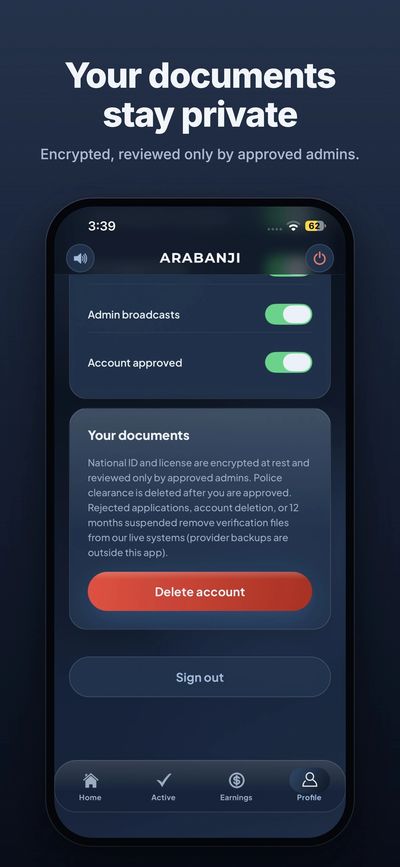
If you are an Arabanji driver, you can delete your account and personal data directly from the app:
1. Open the Arabanji driver app and sign in.
2. Tap "Profile" in the bottom menu.
3. Scroll down to the "Your documents" section.
4. Tap the red "Delete account" button and confirm.
What happens to your data: deleting your account removes your verification files (National ID and driving license) from our live systems. Your National ID and license are encrypted at rest and reviewed only by approved admins. Your police clearance is already deleted once your account is approved. Backups kept by our hosting providers are outside the app.
---
إذا كنت سائقاً في عربنجي، فيك تحذف حسابك وبياناتك الشخصية مباشرة من التطبيق:
1. افتح تطبيق سائقي عربنجي وسجّل الدخول.
2. اضغط على "Profile" (الملف الشخصي) من القائمة تحت.
3. انزل لقسم "Your documents" (مستنداتك).
4. اضغط على زر "Delete account" الأحمر وأكّد الحذف.
شو بيصير ببياناتك: حذف الحساب بيشيل ملفات التحقق (الهوية الوطنية ورخصة القيادة) من أنظمتنا. الهوية والرخصة بتكون مشفّرة وما بيشوفها إلا المسؤولين المعتمدين، وشهادة عدم المحكومية بتنحذف أصلاً أول ما ينقبل حسابك. النسخ الاحتياطية عند مزوّدي الاستضافة خارج التطبيق.